

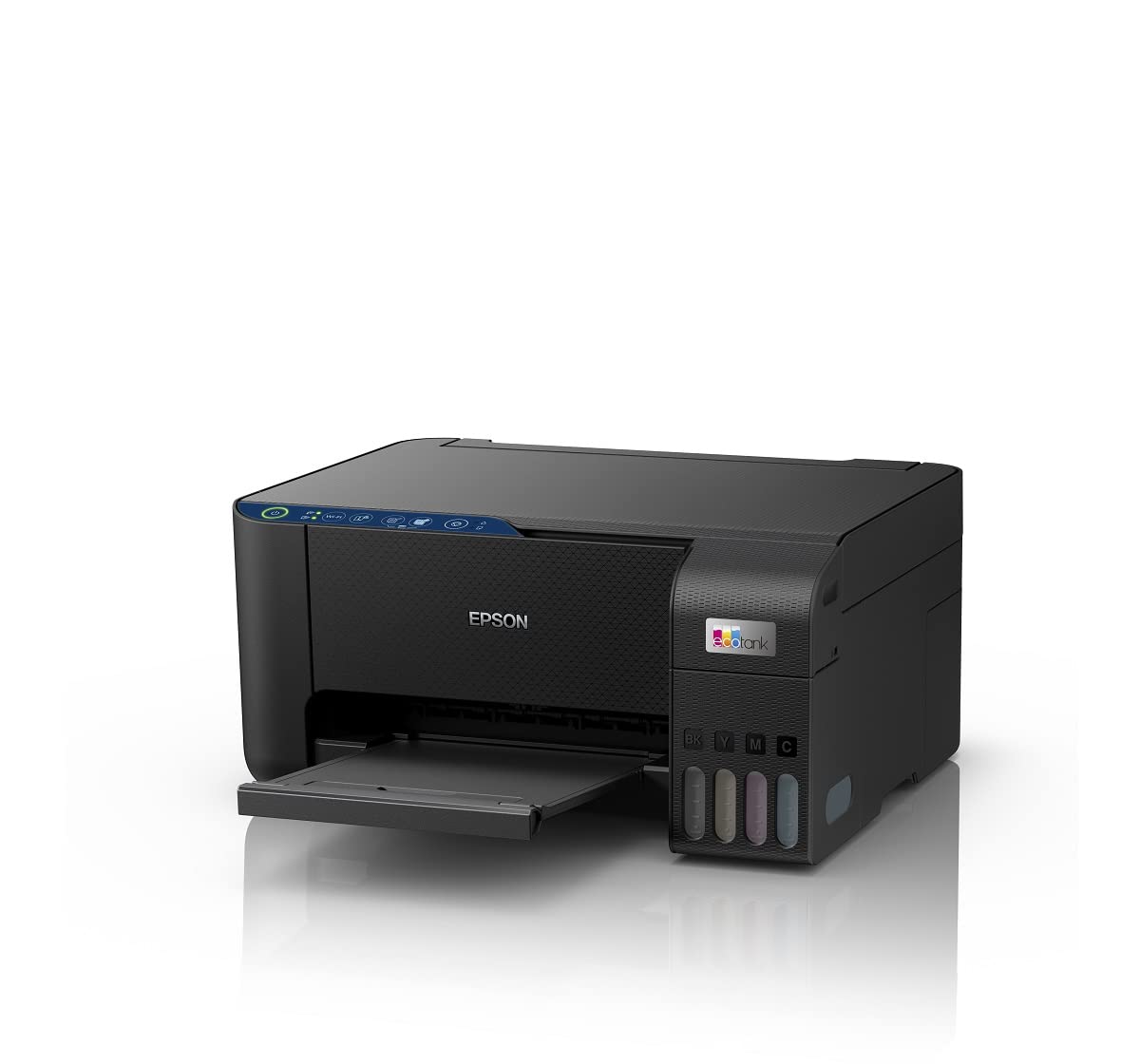

Epson EcoTank L3252 Wi-Fi All-in-One Ink Tank Printer (Black)
Original price was: 17,999.00 $.11,999.00 $Current price is: 11,999.00 $.
Price: ₹17,999 - ₹11,999.00
(as of Jan 18, 2026 08:44:37 UTC – Details)
From the manufacturer
ECONOMICAL AND EFFICIENT PRINTING FOR HOME & SMALL OFFICE
For Home and Small Office
Epson EcoTank printers deliver sharp text and bright colours so you can print, scan & copy all types of documents and photos.
Reduce Environmental Impact
A revolutionary technology that helps consume less power as compared to Laser printers, thereby saving money and the environment.
Integrated InkTank
InkTanks are smartly integrated within the printer and designed to ensure hassle-free and spill-free refilling.
Less E-Waste
High-capacity ink bottles not only reduce the hassle of frequently replacing ink cartridges, but also the material resource consumption for consumables, contributing to the reduction of environmental impact.
Consume Less Electricity
Consume less electricity with Epson Heat-Free Technology. With an operating power of just 12W, it prints even on an UPS.
Print Without Worries
Print at a very low cost in amazing colour or black.
Get More Prints
Up to 4,500 pages black & up to 7,500 pages colour* with economical genuine refill ink bottles.
*Composite Colour
Connect Any Device
Connect effortlessly with wireless connectivity and with the Epson Smart Panel app you can now access functions such as print, scan and copy from your mobile device.
Add to Cart
Add to Cart
Add to Cart
Add to Cart
Add to Cart
Customer Reviews
4.0 out of 5 stars 3,516
4.0 out of 5 stars 3,658
3.9 out of 5 stars 116
4.1 out of 5 stars 436
3.9 out of 5 stars 386
4.1 out of 5 stars 354
Price
₹13,699.00₹13,699.00 ₹11,999.00₹11,999.00 ₹13,899.00₹13,899.00 ₹15,699.00₹15,699.00 ₹22,599.00₹22,599.00
— no data
Printer Type
Colour Printer|Scanner|Copier Colour Printer|Scanner|Copier Colour Printer|Scanner|Copier Colour Printer|Scanner|Copier Colour Printer|Scanner|Copier Colour Printer|Scanner|Copier|ADF
Printing Technology
Inkjet Inkjet Inkjet Inkjet Inkjet Inkjet
Max Resolution
5760 x 1440 dpi 5760 x 1440 dpi 5760 x 1440 dpi 5760 x 1440 dpi 5760 x 1440 dpi 4800 x 1200 dpi
Print Speed – Black/Colour
Up to 10ipm/5.0ipm Up to 10ipm/5.0ipm Up to 10ipm/5.0ipm Up to 10ipm/5.0ipm Up to 10ipm/5.0ipm Up to 15.5ipm/8.5ipm
Automatic Document Feeder
No No No No No
✓
Auto Duplex Printing
No No No No
✓
✓
Connectivity
USB & WiFi USB & WiFi USB & WiFi USB & WiFi USB & WiFi USB, WiFi & Ethernet
Colour LCD Display
No No No
✓
✓
✓
Cost per print Black/Colour
9/24 Paise* 9/24 Paise* 9/24 Paise* 9/24 Paise* 13/30 Paise* 13/30 Paise*
MRP
Rs.17,999/- Rs.17,999/- Rs.17,999/- Rs.18,999/- Rs.23,999/- Rs.29,999/-
All-in-One Printer (Print, Scan, Copy)
Economical and Eco-Friendly Heat Free technology.
Low cost per page
Space-saving Design, Spill-free Refilling
Smart Wi-Fi and App enabled for easy and user-friendly usage.

Golam Sarwar –
The Epson EcoTank L3252 is an excellent all-in- one printer for home
Very nice product 🌟🌟🌟The Epson EcoTank L3252 is an excellent all-in-one printer for home and office use. Print quality is sharp for both documents and photos, and the ink tank system makes printing extremely affordable in the long run. Wi-Fi connectivity works smoothly with mobile printing, and ink refilling is simple and mess-free. Overall, it’s a reliable, cost-effective printer with great performance and low running cost.
CarShringaar –
Good home use all in one printer
Over all good printer for all kind of home uses, good enough photo prints, moderate print speed sufficient for home use and a good scanner functionality. Only thing which bothers is wifi range of the printer when connected with mobile phone, could have been better. Paper feeder could have been better may be with some vertical support. Also need to mention about the application its a bit confusing some times service centers technicians suggest to install one application and then epson application suggest some other application btw both these epson apps works with the printer, Over all nice product. One star deducted for paper feeder, wifi range issue.
Aditya Rathi –
Epson EcoTank L3252 – A Printer That Feels Like a Long-Term Investment, Not Just a Purchase
If there’s one printer that truly delivers on performance, reliability, and long-term savings, it’s the Epson EcoTank L3252. I’ve used multiple printers over the years, but this one stands miles ahead — not because it’s flashy, but because it does everything right and keeps delivering without drama.The print quality is crisp, sharp, and consistent — whether it’s documents, photos, school work or office use. Colors come out vibrant, blacks are deep and clean, and the details never look washed out. The ink efficiency is almost unbelievable — one refill lasts ages, and prints cost literally feel like pennies per page. If you’re tired of buying cartridges again and again, this printer is a breath of fresh air.Wi-Fi printing is smooth, fast and extremely convenient — I print directly from my phone and laptop without connecting a single wire. It wakes up, prints, and finishes without delay. Scanning is just as easy, and the quality is excellent for digital storage and PDFs. For home, business, work-from-home setups or even a student desk, it fits perfectly.The EcoTank line has always been known for reliability — but this L3252 model feels refined to perfection. It runs quietly, doesn’t clog up if you leave it idle for days, and maintenance is minimal. You literally refill, print, forget, and continue.The highlights that make it a winner:✔ Ultra low running cost✔ Rich color output + high clarity text✔ Wi-Fi printing that works instantly, every time✔ No frequent ink changes or cartridge headache✔ Perfect for home, office, students & business use✔ A long-term printer that saves money, time & stressThis is not just a printer — it’s peace of mind for years.If you want a machine that prints beautifully, lasts long, and doesn’t burn money on ink, the Epson EcoTank L3252 is easily one of the smartest buys you can make.Efficient, economical, and effortlessly reliable — a true all-round champion.
Suhail Alam –
Defective product with used and old parts provised by seller
Seller is sending defective product. Product stopped working after few months and everything is defective.on i spection by Epson team sofware is showing printing of 120000 prints .even i have hardly printed 50 pages .used printer with old parts i stalled has bee send to us.Dont belive this seller Click tech retails which is showing adress of Mewat.buy from authentic epaon atorea not from here
Biswajit Prasad –
Fabulous product 👌
Great product for home usage. Able to print great quality of printing styles wire colour. The WiFi ecosystem was too decent. Although packaging was very avg. With the help of some youtube videos , it is easy to get installation and get to use of it.Desclaimer: It supports Manual Duplex printing. Not automatic.
Aniruddha Sawant –
A budget friendly AIO quality printer for home use
Bought the printer for ₹13,799. It being a AIO, has print, copy, scan. Printing quality is good. Inwould recommend using higher GSM paper as the ink creates impressions on the backside of thinner GSM page such as 70. Though this type of printers are made for high volume printing, it is suitable for use at home too if you print occasionally but consistently. Printing once a week is recommended to avoid drying of ink. One think Epson & Amazon product page fails to mention is the presence is a waste ink box in the printer. As the name suggests it catches the running off or the waste ink and gets full over time. Once full the printer will simply stop working and you will need to contact Epson Support to have to replaced. The materials used are high quality plastic but you can hear creaking and parts shifting when pressing on the printer body. It certainly looks better than the comparable Brother 426W. If you are not technically not adept then please call a support technician to help you install it. Though the instructions manual is very concise and easy to follow while helping you install and connect the printer to a device. Ensure you perform a printer head alignment test and colour printing test to judge the quality of the color print quality.As for packaging, a lot can be improved. The seller shipping the product without any external Amazon packaging. The product was received in the original manufacturer packaging but was wrapped in a plastic sheet for protection. The movers also tore the sheet to access the hand hold on the box. This exposed the device to external elements.The speed of delivery was excellent. Ordered it on a Saturday and received it Monday morning. The delivery went as usual, but the delivery person did not ask for a sign or OTP. The delivery instructions by Amazon indicated a two person delivery would occur but that was not the case. Only one individual delivered this product.